
52 lines
3.8 KiB
XML
52 lines
3.8 KiB
XML

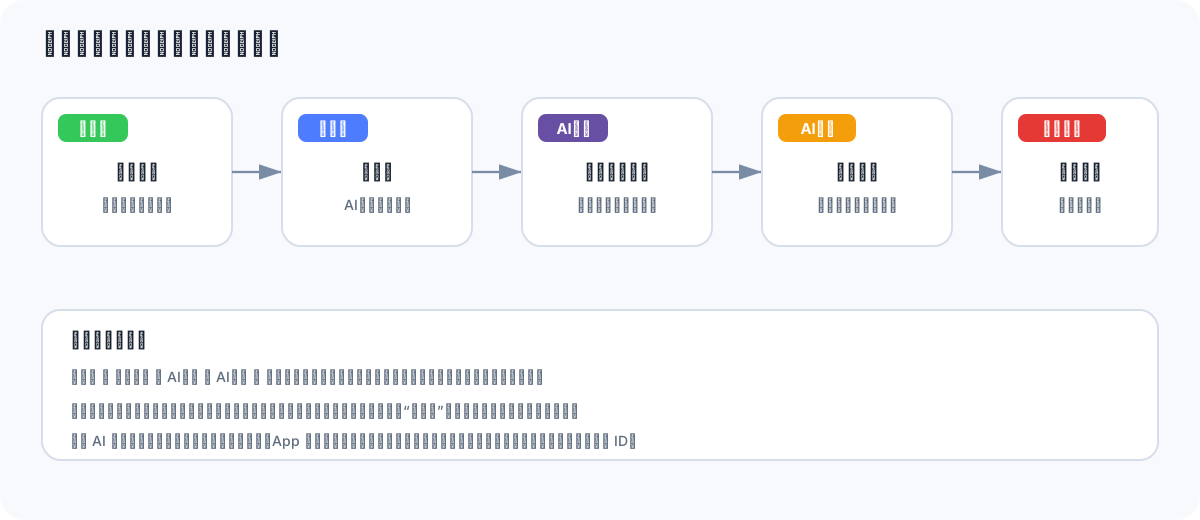


<svg xmlns="http://www.w3.org/2000/svg" width="1200" height="520" viewBox="0 0 1200 520">
|
||
<defs>
|
||
<marker id="arrow" markerWidth="10" markerHeight="10" refX="9" refY="3" orient="auto">
|
||
<path d="M0,0 L0,6 L9,3 z" fill="#7A8CA5"/>
|
||
</marker>
|
||
<style>
|
||
.title { font: 700 24px -apple-system, BlinkMacSystemFont, "PingFang SC", sans-serif; fill: #182230; }
|
||
.label { font: 700 17px -apple-system, BlinkMacSystemFont, "PingFang SC", sans-serif; fill: #182230; }
|
||
.small { font: 14px -apple-system, BlinkMacSystemFont, "PingFang SC", sans-serif; fill: #5D6B7C; }
|
||
.card { fill: #FFFFFF; stroke: #D5DEE9; stroke-width: 2; }
|
||
.line { fill: none; stroke: #7A8CA5; stroke-width: 2.3; marker-end: url(#arrow); }
|
||
.badge { font: 700 15px -apple-system, BlinkMacSystemFont, "PingFang SC", sans-serif; fill: #FFFFFF; }
|
||
</style>
|
||
</defs>
|
||
<rect width="1200" height="520" rx="24" fill="#F7F9FC"/>
|
||
<text x="42" y="52" class="title">相册缩略图结果类型与状态优先级</text>
|
||
<rect x="42" y="98" width="190" height="148" rx="18" class="card"/>
|
||
<rect x="58" y="114" width="70" height="28" rx="8" fill="#34C759"/>
|
||
<text x="93" y="134" text-anchor="middle" class="badge">已上传</text>
|
||
<text x="137" y="178" text-anchor="middle" class="label">普通原图</text>
|
||
<text x="137" y="210" text-anchor="middle" class="small">显示服务端缩略图</text>
|
||
<path d="M232 172 H282" class="line"/>
|
||
<rect x="282" y="98" width="190" height="148" rx="18" class="card"/>
|
||
<rect x="298" y="114" width="70" height="28" rx="8" fill="#4D7CFE"/>
|
||
<text x="333" y="134" text-anchor="middle" class="badge">修图中</text>
|
||
<text x="377" y="178" text-anchor="middle" class="label">处理中</text>
|
||
<text x="377" y="210" text-anchor="middle" class="small">AI入口同步置灰</text>
|
||
<path d="M472 172 H522" class="line"/>
|
||
<rect x="522" y="98" width="190" height="148" rx="18" class="card"/>
|
||
<rect x="538" y="114" width="70" height="28" rx="8" fill="#6750A4"/>
|
||
<text x="573" y="134" text-anchor="middle" class="badge">AI已修</text>
|
||
<text x="617" y="178" text-anchor="middle" class="label">普通修图结果</text>
|
||
<text x="617" y="210" text-anchor="middle" class="small">缩略图展示最新结果</text>
|
||
<path d="M712 172 H762" class="line"/>
|
||
<rect x="762" y="98" width="190" height="148" rx="18" class="card"/>
|
||
<rect x="778" y="114" width="78" height="28" rx="8" fill="#F59E0B"/>
|
||
<text x="817" y="134" text-anchor="middle" class="badge">AI封面</text>
|
||
<text x="857" y="178" text-anchor="middle" class="label">封面结果</text>
|
||
<text x="857" y="210" text-anchor="middle" class="small">显示封面模板排版图</text>
|
||
<path d="M952 172 H1002" class="line"/>
|
||
<rect x="1002" y="98" width="156" height="148" rx="18" class="card"/>
|
||
<rect x="1018" y="114" width="88" height="28" rx="8" fill="#E53935"/>
|
||
<text x="1062" y="134" text-anchor="middle" class="badge">修图失败</text>
|
||
<text x="1080" y="178" text-anchor="middle" class="label">失败结果</text>
|
||
<text x="1080" y="210" text-anchor="middle" class="small">可再次修图</text>
|
||
<rect x="42" y="310" width="1116" height="150" rx="18" fill="#FFFFFF" stroke="#D5DEE9" stroke-width="2"/>
|
||
<text x="70" y="346" class="label">状态显示优先级</text>
|
||
<text x="70" y="382" class="small">修图中 > 修图失败 > AI封面 > AI已修 > 已上传。高优先级状态先展示,避免处理中或失败被旧成功结果遮盖。</text>
|
||
<text x="70" y="416" class="small">成功:缩略图切换为最新修图图或封面图;再次成功:覆盖旧结果;还原原图:回到“已上传”;删除素材:同步清除本地结果。</text>
|
||
<text x="70" y="446" class="small">当前 AI 修图、封面结果及角标为本地演示数据,App 进程重启后会清空;服务端接入后应返回结果类型、状态、结果图地址和模板 ID。</text>
|
||
</svg>
|